On-Demand Archives on S3

Published rustawss3lambda
Disclaimer: this article has been automatically translated from my original one in French. I reviewed it for technical accuracy only, so it may feel weird to read for native English speakers.
Introduction #
Last year, I celebrated my civil union with about a hundred people. For the occasion, I had built a web application to manage invitations, each guest’s menu choices, information sharing, and… photos. My wife and I wanted the photos centralized in one place, where each guest could upload, view, and download them. And that’s where you might start to see the connection with this article’s title.
To build all of this, I naturally turned to a Serverless solution on AWS. And for photo storage, I obviously chose Amazon S3 with Intelligent-Tiering enabled — the best possible solution when the goal is reliability, minimum cost, and zero management once it’s live.
So I wanted my guests to be able to download the photos. Of course, since they’re in S3, it would have been relatively easy to have the application generate a PreSigned URL[1] to download a single photo[2], but since I anticipated having hundreds or even thousands of photos, downloading them one by one that way seemed impractical. So I started thinking about a solution that would let a guest select photos (including “all of them” if desired) and request the creation of a downloadable archive.
Working Assumptions #
When developing the solution, I didn’t really have a clear picture of the target volume. But I was absolutely certain that I didn’t want my solution to choke in production! Some of the guests were also colleagues, so my honor as a Cloud Architect was at stake! 😤
No way it would lag or crash under real conditions — so I preferred to think big on the working assumptions:
- a photo is ~5 MB;
- there will be 3,000 photos;
- the system must be able to handle a “Download All”;
- the corresponding archive must be produced in 5 minutes max.
I therefore need to build a solution capable of downloading 3,000 objects and 15 GB from S3, then uploading a 15 GB archive[3] in under 5 minutes.
Lambda #
There are obviously many ways to do this, but I had one constraint (perhaps slightly self-imposed, I’ll admit 😅): I’m in a serverless context! No way I go spinning up an EC2 instance to do the job. An ECS container on Fargate could have been considered, but I always prefer working with Lambda. And I wasn’t going to spin up an ECS cluster just for that 🙄.
So the solution has to fit within Lambda, which imposes certain constraints:
- 15 minutes maximum;
- 10 GB of RAM maximum;
- 10 GB of local storage maximum (what you have available in
/tmp).
On the time side, no problem with the 15-minute limit: I want it to be faster than that anyway.
On the space side, however, things get much more interesting.
The Space Constraint #
15 GB to download, 15 GB to upload… and 10 GB maximum in between. This completely rules out a “naïve” sequential approach of: download everything, then compress, then upload the result. In the worst case, you’d need 30 GB of storage (photos + archive), and in the best case 15 GB if you create the archive while deleting photos as you go. So it doesn’t work: you have to stream, meaning upload the archive as you download the photos.
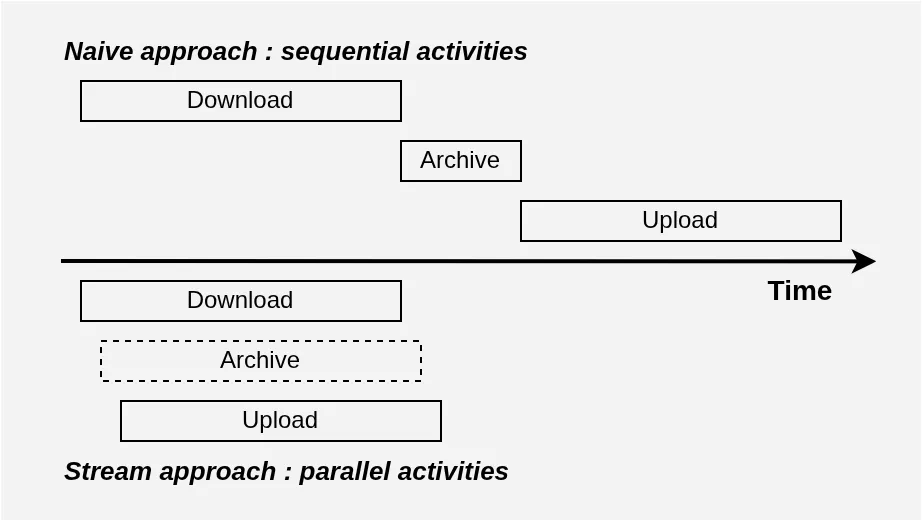
One might object that I could skip Lambda altogether, or even use EFS storage to work around this constraint. True, but in reality the naïve approach is also incompatible with the 5-minute ambition. In a problem like this, you can easily convince yourself that ultimately the bottleneck will come from network bandwidth: a lot of data needs to travel back and forth to S3. If we assume 600 Mb/s symmetric bandwidth available[4], then the “naïve” solution can do no better than (15 GB * 8) Gb / 0.6 Gbps = 200 seconds to download, then another 200 seconds to upload, for a total of 400 seconds: over 5 minutes! And note that this doesn’t even count the time to create the archive…
If we stream instead, we use the download bandwidth and the upload bandwidth at the same time! And the archive is built on the fly. So we can hope to do just over 200 seconds total: much better, and under 5 minutes!
See for yourself:
But is it possible to stream in our case?
Streaming a ZIP Archive #
Writing a program that downloads and uploads at the same time is fairly straightforward. But what about creating the ZIP archive? Can it be streamed?
In principle, a compression algorithm needs to see all the data it’s compressing to work efficiently[5]. In our case, that’s impossible: we specifically want to avoid downloading everything before starting to build the archive. Besides, we also need to avoid seeking backwards while writing: once we’ve sent a chunk of our archive to S3, it becomes difficult to modify it. This last point is particularly problematic with the standard ZIP file format[6].
In practice, it’s better to drop compression altogether, which is useless anyway with image formats that are already compressed. The ZIP format supports an “archive-only” mode with no compression algorithm. Better yet, it offers a “streaming” write mode that guarantees no backwards seeking.
In principle, we can therefore start building our archive and send chunks as we go, thanks to S3’s multipart upload[7] feature:
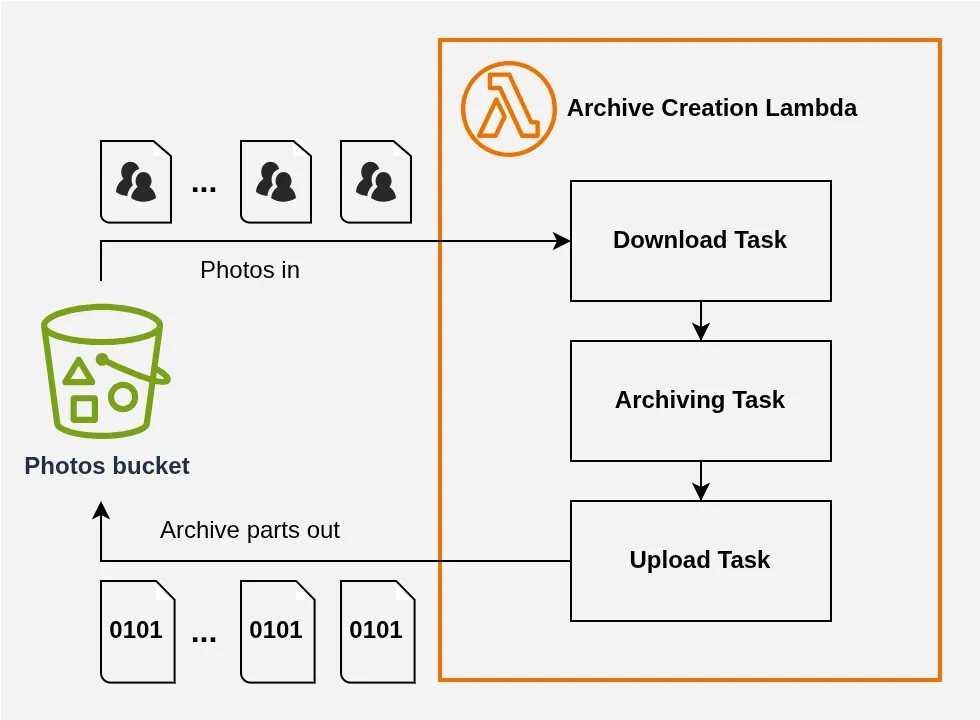
We’re making progress, but one improvement is in order.
Saturating the Bandwidth #
The previous diagram shows a single download task and a single upload task, but we don’t want to download (or upload) files one by one sequentially: that would be a waste of resources!
For one thing, the opening and closing of the TCP and TLS connections underlying the downloads (and uploads) are negligible in terms of volume, but they require handshake negotiations[8] that involve round trips with the service and take time. These are therefore phases where bandwidth isn’t being used, which pushes us further from the theoretical best time (for example, ~200 seconds at 600 Mbps, see Figure 1).
Furthermore, the TCP protocol is remarkable in its ability to adapt to fluctuations in available bandwidth[9], but the downside is that it gives it a certain inertia: ramping up to full speed on a new connection is relatively slow. To saturate the bandwidth, it’s therefore advantageous to always have a majority of connections already running at their full potential speed.
If we were doing sequential downloads, these two phenomena would make bandwidth utilization suboptimal:
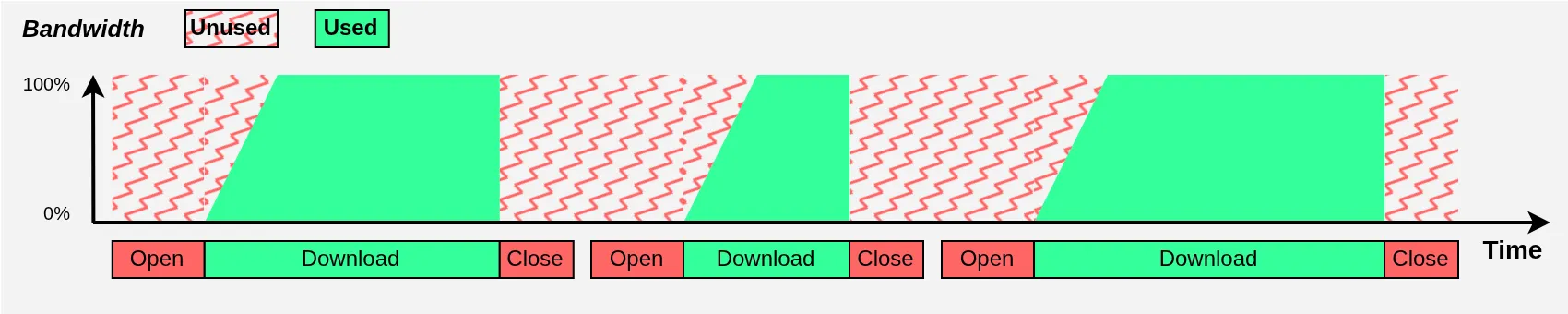
I obviously exaggerate both phenomena for illustration purposes, and it’s clear there’s a significant efficiency loss. But look at what happens when using multiple download threads in parallel:
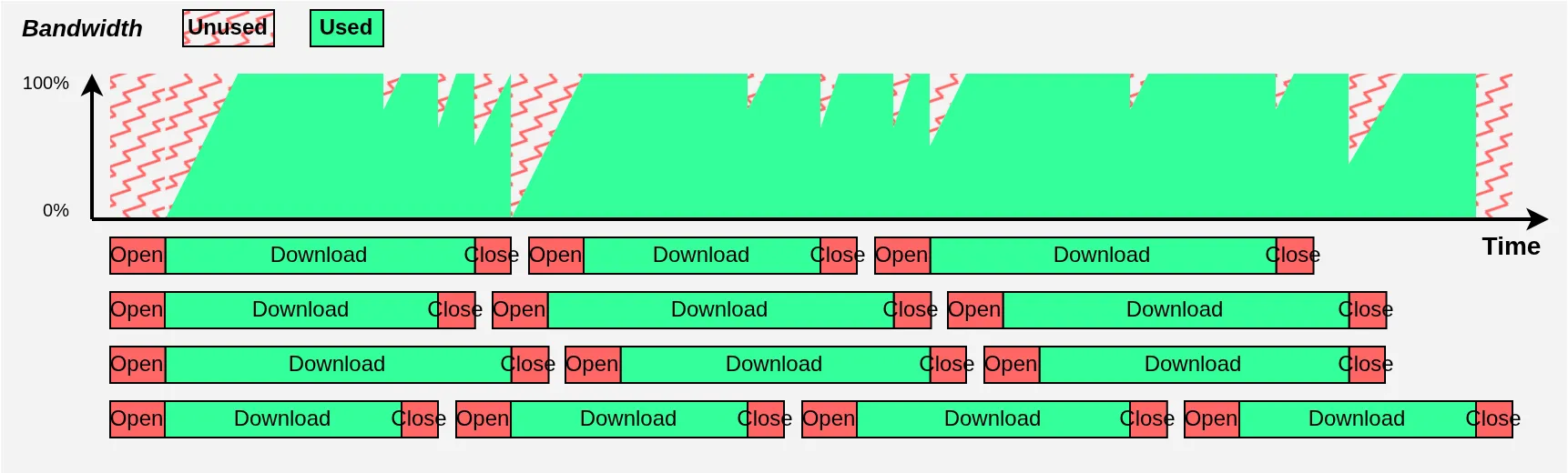
Much better!
For one thing, since the bandwidth is shared across multiple connections, each connection’s download time grows longer, which reduces the relative importance of connection opens and closes. More importantly, when one download finishes we no longer suddenly lose 100% of bandwidth utilization as in the previous diagram: we only lose that download’s share. The still-running downloads will immediately react (thanks TCP) and share the newly freed bandwidth to quickly get back to 100%.
In the end, even with just 4 threads for illustration purposes, we occupy our bandwidth much more effectively. In practice, you can use around twenty threads to stay continuously close to 100% utilization[10]. Note also that I focused on downloads in the diagrams, but the same logic applies to uploads, which will therefore also be multi-threaded.
Our updated high-level diagram becomes:
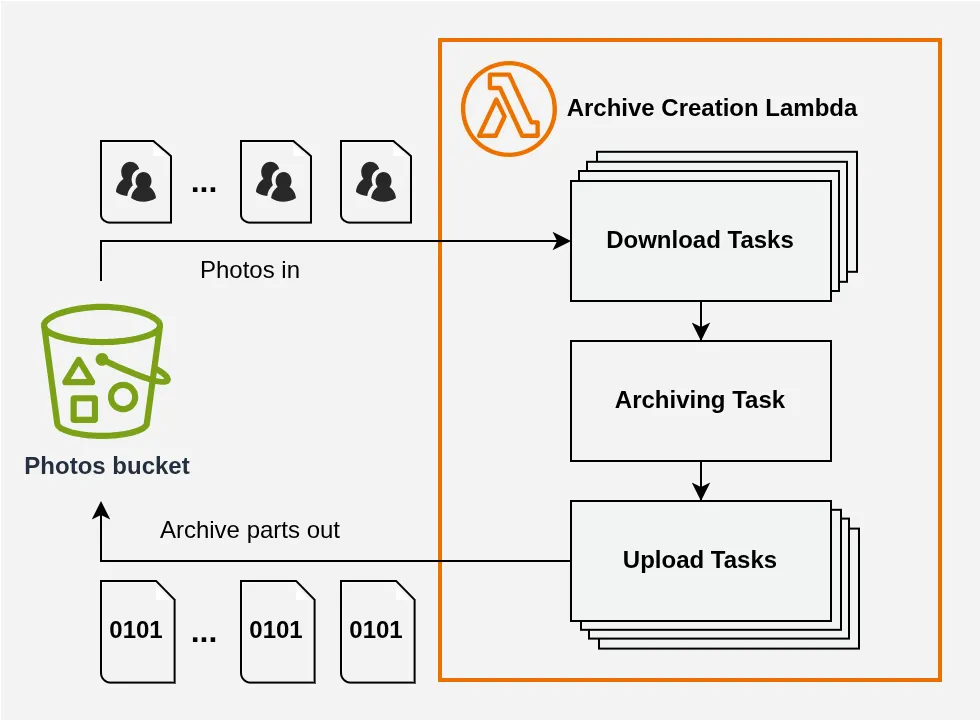
Note that archiving remains single-threaded: there’s nothing to gain from parallelizing this task, which will be bottlenecked by network speed anyway, and it would be impossible to orchestrate regardless.
And with that, we arrive at the real challenge: memory management.
Managing Memory Properly #
If you’re used to writing your Lambdas in languages like NodeJS, Python, Java, or Go, you’re probably used to treating memory usage as an imposed constraint from which you choose your Lambda function’s configuration. That’s normal. After all, one of the main promises of object languages is automatic memory management, and in practice the programmer’s control over that management is limited.
However, in a use case like ours, that’s problematic.
At minimum, 30 GB will be written to our Lambda’s memory: the 15 GB of photos that will be downloaded and the 15 GB of archive that will be computed[11]. For our archive creation to go smoothly, it is therefore critical to free memory as we go, even if our Lambda were configured with the maximum 10 GB of RAM.
Another related point: the minimum amount of memory required by the operations. Taking the values already mentioned of 5 MB per photo on average and 20 simultaneous downloads, we conclude that we need at minimum 20 x 5 MB = 100 MB of memory dedicated to photos before archiving. By symmetry, we can also plan for 100 MB for the archive parts currently being uploaded. We therefore need at least 200 MB of memory, in the best case: assuming no unnecessary data duplication throughout the process.
Now, object languages using a garbage collector[12] such as those I mentioned are very poorly equipped to meet these kinds of constraints:
- the GC must free memory very frequently, pausing program execution and impacting overall performance;
- initially, the GC might try to occupy all available space (looking at you, Java), which could cause increasingly expensive reallocations, again severely impacting performance[13];
- the programmer has limited control over in-memory data copying, so the amount of memory needed by operations can far exceed the 200 MB calculated above, just as the total amount of data written could far exceed 30 GB, amplifying the aforementioned impacts;
- we might perhaps compensate by increasing our Lambda’s memory, without actually improving total execution time: a cost increase with no real benefit[14];
- the autonomous nature of the GC and its performance impact potentially induces a great deal of uncertainty about the time needed to create an archive, complicating validation of the under 5 minutes goal.
Note: These points are mostly valid for Java, Python, and JS. Go has a GC, but it’s specifically optimized against these issues, so it would be interesting to see whether it could handle our use case.
A few months ago, I spoke with a client who had a use case very similar to the one we’re examining. They told me they had tried writing a Lambda in NodeJS, and that regardless of how much memory they configured, they always observed a progressive performance degradation during archive creation that consistently ended in failure (lambda timeout), for a volume far smaller than what we’re looking at in this article. It was a chance conversation during a coffee break and I never got to see their code, so I can’t make any definitive claims about the cause of the failure. But I’m not surprised, and I suspect it has to do, at least in part, with the problems introduced by a garbage collector.
Let’s look at what might actually work.
A Theoretical Solution #
The system we need must check a few boxes:
- avoid data duplication/copying in memory as much as possible, to get as close as possible to the theoretical minimum mentioned earlier (200 MB);
- automatically regulate download and upload to maintain balance between incoming photos and outgoing archive chunks, even if (for example) download bandwidth exceeds upload bandwidth;
- support streaming creation of our archive.
That last point about streaming is not easy when it comes to archive creation — it requires reconciling contradictory requirements:
- the archiving task needs what appears to be a continuous, unlimited buffer to write the archive into;
- while the size of this archive, and therefore of this buffer, will far exceed the available RAM in any scenario;
- and at the same time, the upload tasks need well-defined, numbered chunks for the multipart upload to S3.
This calls for a custom data structure tailored to our problem. Personally, the “continuous and unlimited” requirement immediately made me think of a Ring Buffer[15] variant, and after some experimentation and refinement, here is what I designed:
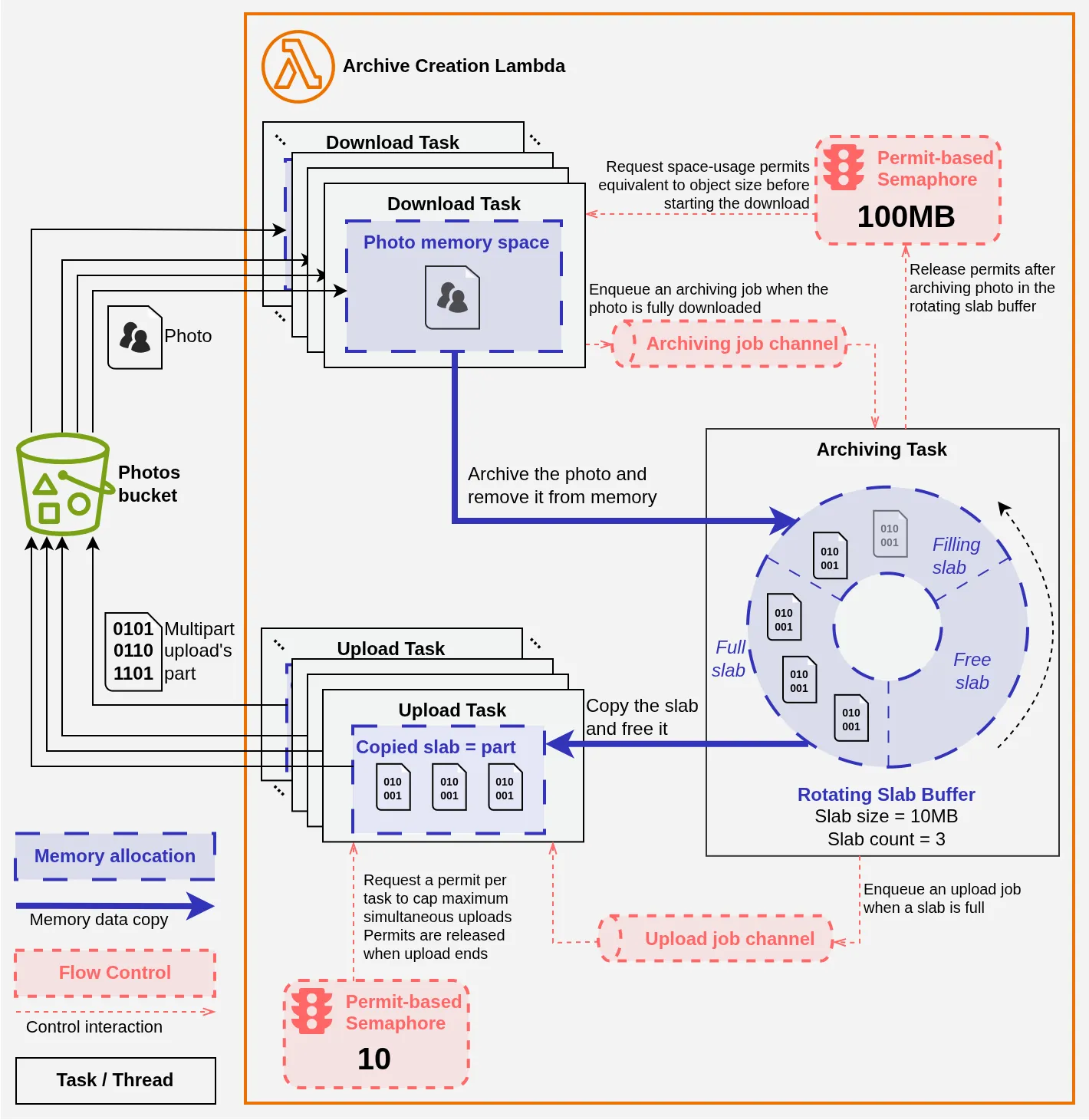
The diagram is dense, but you’ll see that in principle it’s not that complicated. It represents our different tasks (download, compression, and upload) and their interactions:
- with memory;
- with the control systems that regulate the data flow.
Download #
The download tasks write each image to memory in an individual buffer. To limit the total memory space occupied by photos before archiving, each download task must acquire a permit for each byte of the image to be downloaded from a semaphore[16] holding ~100 million permits (i.e., 100 MB). When there aren’t enough permits available, the task waits and doesn’t start the download. The permits thus acquired remain associated with the memory space occupied by the image until it is freed. This ensures that there can never be more than 100 MB of downloaded or in-progress photos in memory at any given time.
When a download task completes, it signals the archiving task via a dedicated communication channel (the Archiving Job channel in the diagram). The archiving task reads the photo, archives it into an internal buffer, then frees the memory occupied by the photo and returns the associated permits to the semaphore, allowing other download tasks to start.
Archiving and Upload #
The archiving task uses a ZIP library to which I expose the Rotating Slab Buffer: this is the centerpiece of the system that reconciles the contradictory requirements mentioned above.
The Rotating Slab Buffer uses Rust’s trait system[17] to “make each task believe” it has the appropriate data structure:
- the Write trait lets it present itself to the archiving task as a continuous, infinite memory section;
- meanwhile, it appears as an iterator producing ordered, fixed-size buffers to the upload tasks.
Concretely, internally it’s a circular buffer pre-divided into data slabs that each represent a future part of the multipart upload to S3. When the ZIP library writes, we fill the Filling slab. When that slab is full, we mark it as Ready and simply continue writing into the next Free slab, which becomes Filling. In parallel, we signal that a slab is Ready to the upload tasks via a dedicated communication channel (the Upload Job channel in the diagram).
An upload task then tries to acquire a permit from a semaphore. Once acquired, it copies the slab’s content and marks it Free, so it can be reused by the archiving task. All that’s left is to upload the data to S3 as a part of the multipart upload. Since slabs are guaranteed to be exposed to upload tasks in order, incrementing a simple shared counter correctly numbers the multipart upload.
And there you have it.
Data Flow Regulation and Maximum Memory Usage #
The beauty of the system is that it self-balances and prevents data accumulation in memory in a completely passive way: no need for explicit synchronization between download and upload tasks. By describing how this passive regulation works, we can also calculate the theoretical maximum amount of memory the program will consume.
Consider what happens if upload is slower than download — that is, if data comes in faster than it goes out:
- We quickly end up with 10 upload tasks in progress, the maximum allowed by the semaphore, each holding a slab copy of 10 MB: that’s
10 x 10 MB = 100 MBof memory; - With no new upload task allowed, our Rotating Slab Buffer ends up with only
Readyslabs:3 x 10 MB = 30 MBof memory; - Unable to write images, the archiving task doesn’t free the associated memory or the download permits tied to it;
- We accumulate completed downloads until we approach the semaphore’s maximum: 100 MB;
- At that point, nothing more happens until an upload completes, restarting the whole system.
In total, we therefore consume at most 100 MB + 30 MB + 100 MB = 230 MB of RAM[18].
From Theory to Practice… #
In nearly 30 years since my first program, I’ve used many languages:
- VB, my very first;
- C, the one that shaped my systems knowledge;
- plenty of ☕ Java in school;
- a lot of 🐍 Python in my professional life on AWS;
- and a dozen others more incidentally.
The experience I’ve gained is that blueprints of elegant, well-oiled algorithmic machinery drawn in Draw.io like the one I just presented are great on paper, but implementation is a different story.
For starters, in real life the first version of the diagram is much closer to Figure 5 than to Figure 6 🤣: code is worked on, refined… and when it’s written in Python or JS, that refinement process is extremely painful and frustrating. Then, even once you have the right design, you run into all the problems I mentioned with garbage collectors and others, which mean the program’s behavior rarely matches what you imagined.
That’s why I believe the only reasonable option for this use case on Lambda is Rust[19] 🦀! And if you disagree… well, prove me wrong! 😁
🦀 Rust. #
Among the long list of Rust’s advantages, three in particular make it the language of choice for this use case:
- it allows precise control over memory usage;
- it is blazingly fast at runtime, which can only help with our 5-minute limit;
- and unlike C/C++, it delivers this while working with business concepts, not void pointers[20] 😅.
When people talk about Rust, execution speed is often highlighted. It’s true that it’s an undeniable plus and one that’s understandable to any audience, but frankly that’s not where the main value lies, in my opinion.
One of the most brilliant things in my experience with Rust is that for more than 3 years now, I’ve had programs that behave exactly as I imagined, on the first try and with very few surprises. Then, when the refinement phase begins, it goes well: the language is so well-structured that all I need to do is change the type I want to improve, then let the compiler errors guide me. When the compiler is happy again, my program works better than before. It’s simply brilliant.
That’s why I can no longer imagine choosing a different language for my projects, on AWS or elsewhere.
And indeed, on the night of the celebration, it held up! 😆
Results #
With a bucket of 3,000 objects of about 5 MB each (filled randomly — it’s easier than finding 3,000 different images 😅), my Rust 🦀 solution on an ARM64 Lambda in Paris (eu-west-3) with 512 MB of RAM creates the archive in ~215 seconds, that’s 3 minutes 35 seconds.
There would no doubt be a few possible improvements to shave off a few more seconds, but note that we’re fairly close to the theoretical best time of ~200 seconds, given Lambda’s maximum bandwidth of ~600 Mbps. I also find it particularly remarkable to achieve such a result with a Lambda having only 512 MB of RAM — it gives the whole thing a particularly economical and satisfying feel 😌.
So, do you think you can do better with your favorite language? I’ve thought of everything and want to make your life easy! I’ve created a demo project on GitHub that’s very easy to deploy, as long as you have an AWS account and a GitHub account. I’ve organized it to make it easy to add other Lambdas in other languages, and a Step Function handles evaluating the candidates and reporting the results.
🧑💻 👉 https://github.com/RustyServerless/demo-s3-archiving
Feel free to give it a try and submit a PR with your solution — I’m extremely curious to see what other developers could accomplish with a use case like this 😁.
Go and Swift are, to me, the most serious challengers — I hope to see those PRs come in 😉.
Contact Me #
If you encounter a use case similar to this one and would like to discuss it, feel free to contact me.
I also offer other services around Rust and AWS, and I maintain several open-source libraries that can make integrating Rust into your AWS ecosystem easier.
Most AWS APIs allow generating pre-signed URLs. These are URLs that embed in their query strings the information for a future API call, along with the signature for that call, created using the API keys of an IAM role or user. These URLs can then be distributed to anyone, who can use them for a set duration and under conditions determined at signing time. By far the most common use is enabling downloads from or uploads to objects in Amazon S3 (uploading or downloading photos, for example 😉). ↩︎
It would have been even simpler to make the S3 bucket publicly readable, but I only wanted to give access to my guests! There was therefore authentication via Amazon Cognito and a GraphQL API (AWS AppSync) on the backend. The API did all sorts of things, including distributing pre-signed URLs on demand to authenticated guests. ↩︎
You might be tempted to think that if we ZIP our 15 GB of photos the archive will be smaller than 15 GB, but that’s forgetting that a JPEG image is already compressed: there’s not much left to gain. We’ll see shortly that using compression is in any case out of the question. ↩︎
On AWS, available bandwidth typically depends on the size of the underlying machine. With Lambda, it’s not documented, but as of today it appears that 600 Mbps symmetric bandwidth is available regardless. ↩︎
The general operating principle of these algorithms is to detect information redundancies. To put it simply (very simply), the basic idea is that if a certain bit sequence appears multiple times, it is assigned a shorter code in a lookup table, and that code is then written in place of the original sequence. The more frequently a sequence appears, the shorter the code assigned to it — to save as much space as possible. But to know which sequences are most frequent, you need to know all the data to be compressed a priori. Note that many modern compression algorithms can operate on a sliding window and are therefore streamable, at the cost of lower overall compression efficiency. ↩︎
Normally, data needs to be written in the header of each entry, some of which requires knowing the full file: its size, its compressed size, and its checksum. This data can therefore only be known after writing the entire file. This limitation can be worked around using ZIP64 extensions — see wikipedia if you find that fascinating. 😉 ↩︎
Allows uploading an object to S3 in parts, then asking the service to reassemble them at the end. See AWS documentation. ↩︎
We’re talking about “handshakes” — both TCP and TLS have their own — see wikipedia TCP and wikipedia TLS. Note that connection reuse generally avoids having to redo too many handshakes, but in the case of S3 downloads I don’t think that’s possible. ↩︎
Several mechanisms are at play, but the main one here is congestion control. ↩︎
In reality, it depends on the available bandwidth, latency, and typical file size of the files being downloaded. The goal is to ensure there are always a majority of downloads in progress without any individual download taking too long. ↩︎
It is indeed very difficult to avoid a memory duplication between the “raw” photo and the photo “included in the archive”. Even without compression, even assuming they’re the exact same sequence of bytes, they’re still different buffers between which those bytes must be copied. Note also that this is a minimum which assumes no other unnecessary duplication takes place — and in practice there will certainly be some. ↩︎
The main memory management component of an object language. See wikipedia. ↩︎
If you’re not familiar with systems programming, you might imagine that when your program has 1 GB of RAM allocated and grows to 2 GB, the operating system simply extends the already-allocated space — but unfortunately that’s not how it works. In reality, a fresh 2 GB space is allocated, into which the program copies the content of its previous space. It’s also possible to keep multiple disjoint memory spaces, of course, but that can cause other problems. Ultimately, what happens exactly depends on which GC we’re talking about. ↩︎
Keep in mind that Lambda is billed in part by execution time as a function of allocated memory: a Lambda with 1 GB of RAM running for 1 minute costs exactly 4 times less than a Lambda with 4 GB of RAM for the same duration. ↩︎
A buffer whose beginning and end are connected, so you can write into it continuously “as if” it were infinite. You inevitably end up overwriting previously written data, so writes and reads must be synchronized accordingly. See Wikipedia for more. ↩︎
A Semaphore is a data structure shared between multiple tasks/threads for coordination. See Wikipedia for more. ↩︎
Traits in Rust are an abstraction for representing generic behaviors that can be implemented on our types. Similar to Interfaces in some languages, such as Java. ↩︎
In practice it’s higher. There are all the small bits and pieces for managing tasks, semaphores, channels, and so on — but those are completely negligible. More importantly, I obviously use the AWS SDK for Rust to interact with S3, whose allocation internals I don’t control… and unfortunately AWS was less frugal than me in its design! My empirical tests show a peak memory consumption of around 350 MB, which remains remarkably low for processing tens of GB of data. 😉 ↩︎
Ok Seb, I’ll grant you that Swift would probably do the job just fine! ↩︎
Rust 🦀 is a language offering very high-level syntax and a compiled, optimized binary at very low level. A remarkably rare quality and, in my opinion, very underappreciated. ↩︎