Beyond S3 Archive Streaming

Published Updated rustawss3lambda
Disclaimer: this article has been automatically translated from my original one in French. I reviewed it for technical accuracy only, so it may feel weird to read for native English speakers.
Introduction #
A few weeks ago, I wrote an article about creating archives from and to S3 — if you haven’t read it yet: On-Demand Archives on S3.
In it, I explored the use case of generating a ZIP archive on demand inside AWS S3:
- from 3,000 objects already stored in S3;
- averaging 5 MB each, for a total of 15 GB;
- using an AWS Lambda function;
- in under 5 minutes.
The goal was to show that this is more involved than it looks — particularly the need to carefully control memory layout and allocations — and that Rust 🦀 is THE ultimate language for tackling such a use case.
I closed the article with a link to the demo’s GitHub repo and threw down a small challenge: prove me wrong by doing better in another language!
And much to my surprise (and delight), people took the bait 😃!
The Challenge Responses #
As I write this, 3 other developers have joined the game. Here are the results reported by the benchmarking Step Function:
| # | Generation | Language | Author | RAM (MB) | Avg time (seconds) | Std dev / Min / Max (10 runs) | Cost / run |
|---|---|---|---|---|---|---|---|
| 1 | 2 | Rust | JRodon | 512 | 106 | 1 / 105 / 107 | $0.000709 |
| 2 | 2 | Rust | Figment Engine (Fitz) | 640 | 119 | 7 / 113 / 128 | $0.000993 |
| 3 | 1 | Rust | JRodon | 512 | 212 | 1 / 211 / 214 | $0.001416 |
| 4 | 1 | Swift | SebSto | 512 | 235 | 13 / 217 / 250 | $0.001568 |
| 5 | 1 | C | SebSto | 640 | 212 | 2 / 210 / 215 | $0.001767 |
| 6 | 1 | Python (3.13) | SebSto | 1024 | 243 | 16 / 211 / 262 | $0.003235 |
| 7 | 1 | TypeScript (Node 22) | SebSto | 1280 | 230 | 20 / 215 / 272 | $0.003833 |
Special mention to Sebastien Stormacq, who submitted no less than 4 PRs on his own. Huge thanks to you, Seb 🙏. His Swift submission is the most polished of the lot. He wrote an article about it: Can Swift Match Rust on a Lambda Micro-Benchmark? Almost.[1].
So what can we say about these results?
Generation 1 vs. Generation 2 #
There’s an elephant in the room: Gen2 is twice as fast as Gen1, for the same language! So what’s this “generation” business about?
As it turns out, Fitz broke the game.
In my previous article, I pointed out that Lambda’s 600 Mbps (symmetric) bandwidth cap made it theoretically impossible to go faster than 200 seconds — the time required to download (and concurrently upload) 15 GB at that speed. I drew that conclusion based on the streaming architecture I presented, which forces all objects to flow through the Lambda itself.
But Fitz decided to sidestep the limit with a brilliantly smart idea 💡: he leverages S3’s UploadPartCopy API. I was compelled[2] to take my own shot at it, and that’s exactly what we’ll dig into throughout this article.
Three other devs? #
I can see some of you are paying attention. Indeed, I only mentioned Seb and Fitz — that’s only two.
Paul Santus also participated, but in his own way, outside my demo repo. He too broke the game, but differently. Paul’s approach and Fitz’s share one key insight: both exploit the ability to predict the exact layout of the ZIP archive the moment you know the list of objects and the size of each one — as we’ll see shortly.
Paul uses that to fan out the archive creation across multiple Lambda functions, thereby bypassing the 600 Mbps bandwidth cap altogether! Imagine: with 100 Lambdas running in parallel, you get 60 Gbps of bandwidth — enough to process our 15 GB in literally 2 seconds. Completely unbeatable. You can read his article for the full story: S3 zipper challenge: a parallel zip assembly that beats the single Lambda approach.
While I fully appreciate the power of the approach, using a Step Function instead of a single Lambda puts it somewhat in a class of its own. I won’t rule out trying it myself at some point (to think he did his Lambdas in Go 😒), but for now — let’s talk Gen2.
Gen2 Principles #
Fitz was the first to implement the idea, so if you want to go straight to the source, he included a writeup with his PR: Rust contender — figment-engine[3].
His design rests on two central observations: you can predict the ZIP layout ahead of time, and you can use UploadPartCopy instead of UploadPart under certain conditions.
Predicting the ZIP Layout #
The layout of a ZIP archive is fairly straightforward. A header, followed by a payload (the file, compressed or not), then repeat. The archive ends with a Central Directory that essentially recaps each file’s header along with the offset pointing to where it lives.
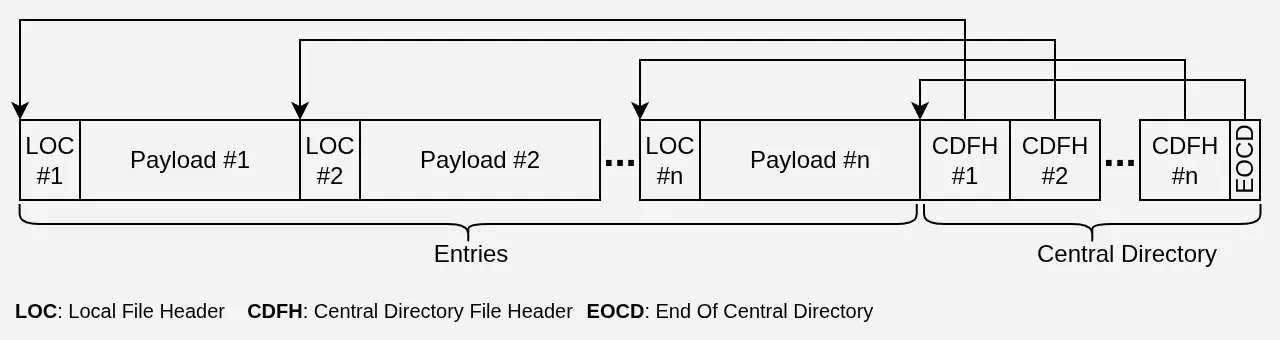
The Local File Headers (LOC) and Central Directory File Headers (CDFH) both contain the name of each entry, so their size is variable but entirely predictable. Once you know each file’s name and payload size, it’s easy to convince yourself that you can predict — down to the byte — where every LOC, every payload, and every CDFH will land.
In our use case, the very first step is a ListObjectsV2 call on the S3 bucket, which gives us the list of objects, their names, and their sizes. Since we’re not compressing, the payload is simply the file’s raw contents and is therefore the same size. All the stars are aligned to know exactly how our ZIP will be organized before we’ve downloaded a single byte — but where does that actually get us?
UploadPartCopy #
The key to any potential gain is S3’s UploadPartCopy API, which lets you instruct S3 to use all or part of an existing object as a part in a multipart upload.
An S3 multipart upload proceeds in three conceptually simple phases:
CreateMultipartUpload: you tell S3 you want to send an object in chunks; it hands you back anUploadId;-
UploadPart: you give S3 theUploadId, aPartNumber, and upload some data;UploadPartCopy: you give S3 theUploadId, aPartNumber, and aCopySource— that is, the bucket and key of the existing S3 object to use as a part — no data to upload on your end;
CompleteMultipartUpload: you signal S3 that you’re done; it uses thePartNumbers to stitch the parts together in order, and — voilà — a new object appears in your bucket.
At this point, a brilliant idea strikes. Keep in mind that across a 3,000-file / 15 GB archive, all the headers combined barely reach 1 MB… So what if we did this:
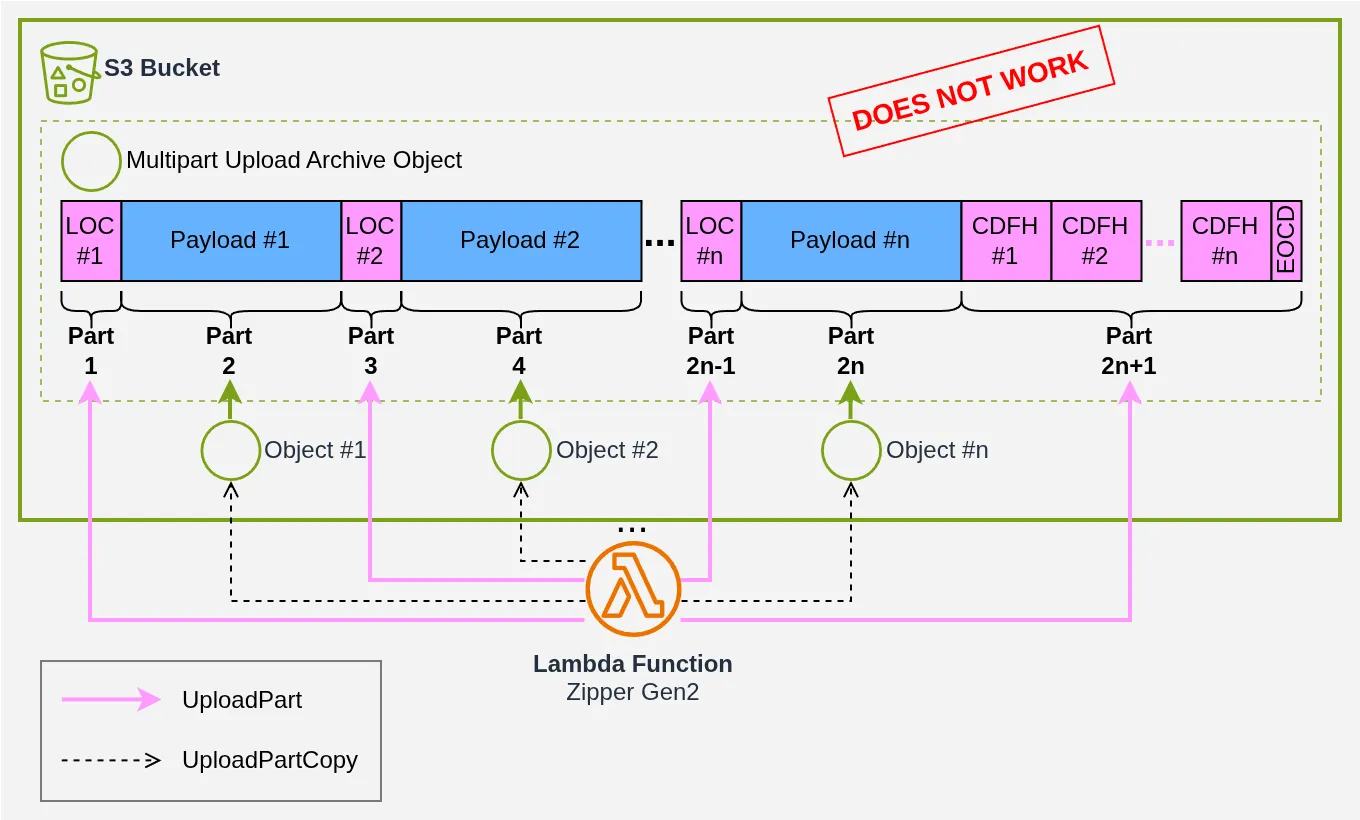
We’d only need to upload the headers and let S3 stitch them together with the large chunks it already holds. Wouldn’t that be something?
Unfortunately, S3 requires that no part be smaller than 5 MB (except the last one), so that naive strategy is a dead end:
- a LOC is far too small (~100 bytes) to stand alone as a part;
- objects under 5 MB cannot be targeted with
UploadPartCopy.
And that’s exactly where Fitz got clever!
You can split files into “big” ones (over 5 MB) and “small” ones (under 5 MB), then alternate: one UploadPart bundling small files and LOC, one UploadPartCopy for a big file, and repeat.
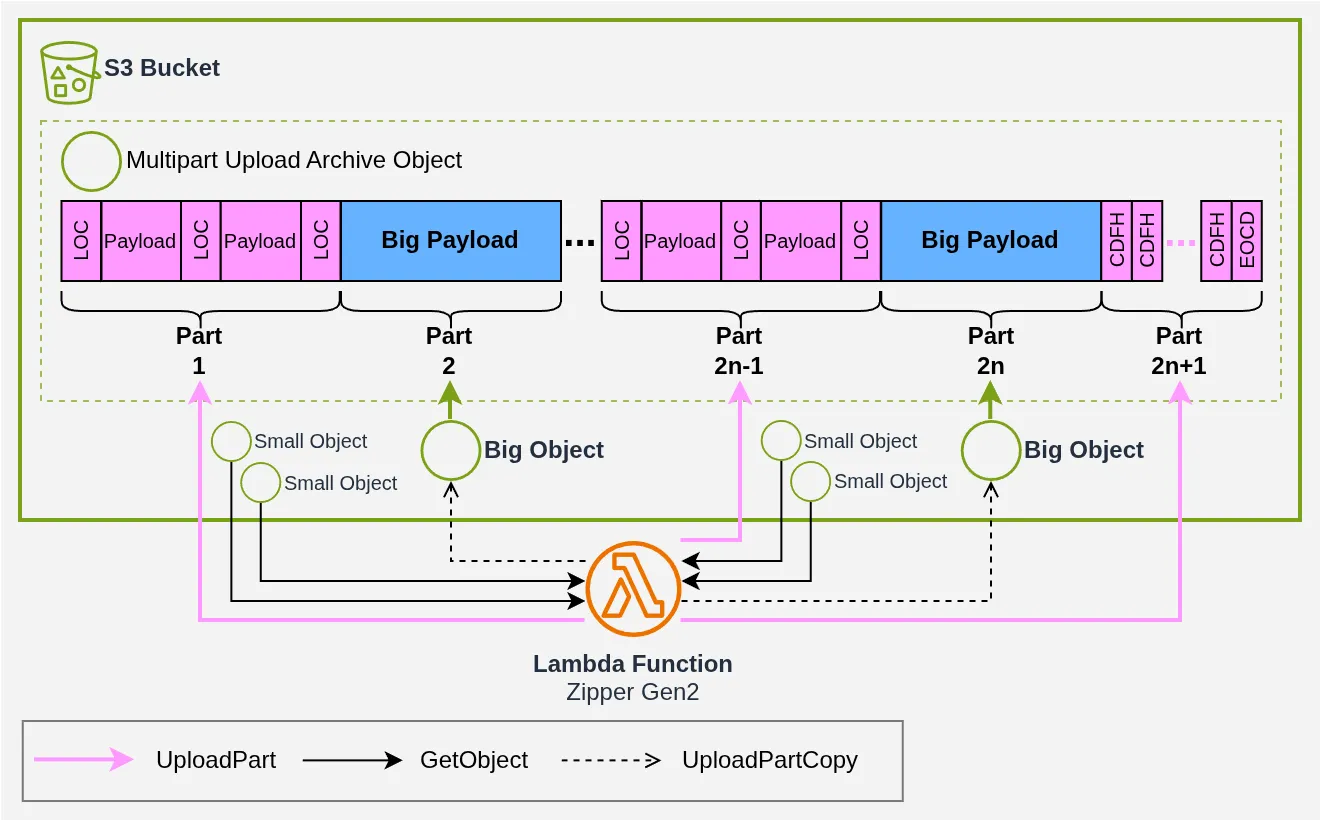
We’re back to downloading the smaller objects before uploading them, but at least we avoid downloading the large ones! Note from the diagram that the alternation between UploadPart and UploadPartCopy is mandatory: for every UploadPartCopy of a “big” file, there must be a preceding UploadPart to write its LOC, so that the resulting archive is valid.
Brilliant in theory — but what kind of performance gain can we realistically expect?
A Bit of Theory #
Working out the exact calculation in the general case gets abstract very quickly, and I haven’t found a way to make it readable in a blog post. So let’s focus on the specific setup of my little challenge. The 3,000 objects average 5 MB each, following a normal distribution[4]:

Statistically, we can form pairs: in each pair, we match an object under 5 MB with an object over 5 MB. Each pair therefore adds up to 10 MB: one UploadPart of 5 MB and one UploadPartCopy of 5 MB. We end up saving exactly 50% of the transfer volume.
Wait, Jérémie — you can’t just take part of the big file’s size and count it toward the
UploadPart!
Oh, but you can 😁! You can do ranged GetObject calls to partially download objects, and ranged UploadPartCopy calls to partially copy them.
Take a pair with a SmallObj of 3 MB and a BigObj of 7 MB. We’re 2 MB short for the UploadPart. We can download the first 2 MB of BigObj to fill the UploadPart, then do a partial UploadPartCopy for the remaining 5 MB of BigObj:
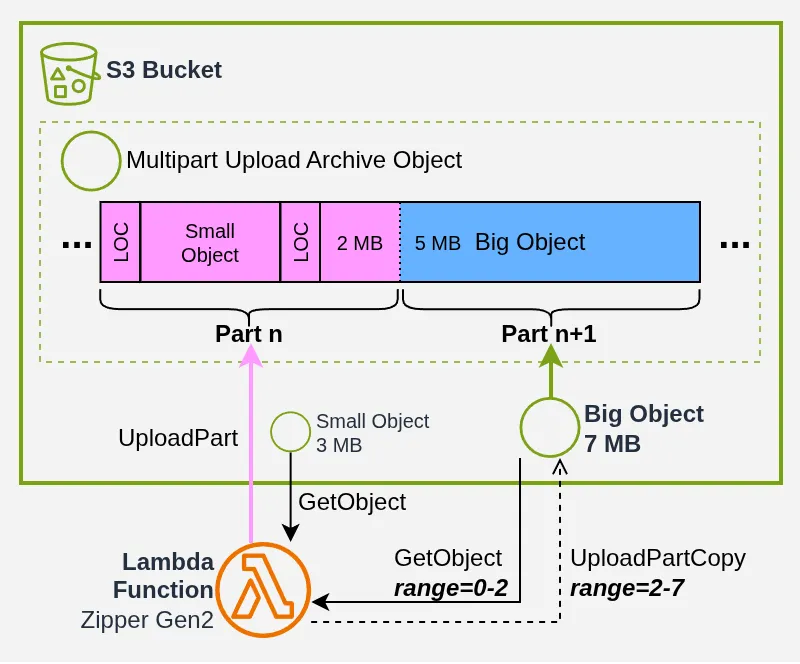
At 3,000 objects, this scales nicely: we may be blocked on a handful of UploadPartCopy calls, but statistically we’ll save 50% of the transfer volume, give or take.
Note: I’m deliberately ignoring header sizes throughout — they’re far too small to matter here, less than 1 MB of headers for nearly 15 GB of archive.
Fitz’s Code #
When I saw the performance numbers Fitz reported in his PR, I immediately knew we could do better. We’ve just seen that we save 50% of the transfer volume in theory. Since bandwidth is Gen1’s limiting factor — holding it to a minimum of 200 seconds — Gen2 should be able to approach 100 seconds.
Yet Fitz’s implementation clocks in at “only” ~120 seconds. That’s too far off.
I didn’t analyze his code in detail, but I skimmed it quickly after writing my own (I didn’t want to be influenced). The strategies we follow seem really quite close[5] — great minds think alike 😃!
So I suppose the difference comes down to execution[6]? If he ever reads this, I’m sure he’ll want to figure it out — I’ll leave that pleasure to him 🙃.
The Strategy #
The goal of the strategy is to form as many Duos as possible: meaning an UploadPart paired with an UploadPartCopy, always respecting the constraint that each part must be at least 5 MB.
When I say “as many as possible,” what I mean is that ideally every BigObj (over 5 MB) should end up in a Duo as an UploadPartCopy. The risk is running out of SmallObj (under 5 MB) to fill the corresponding UploadPart. Another thing to keep in mind: if we can’t fit all BigObj into a Duo, we should prioritize the largest ones first.
With these observations in mind, I designed an algorithm that takes as input the list of objects with their key, size, and name, and produces the ZIP layout as output. Here’s a real example of the plan generated for a 10-object archive (I couldn’t be bothered to draw a diagram for all 3,000 🙄):
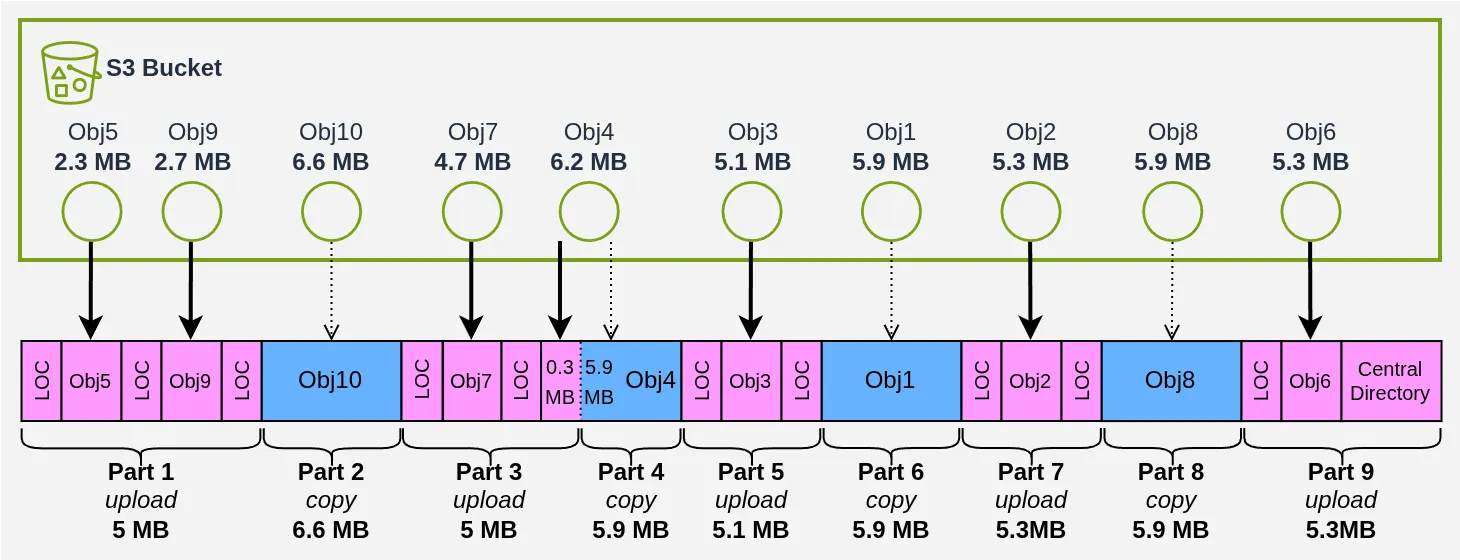
We copy 24.2 MB and download/upload 25.8 MB — almost 50% savings, not bad right? The code is commented and available in the repo for those interested in how we get there.
I should note that my algorithm does not guarantee it will always find the optimal solution[7], but it has the advantage of requiring only a single sort by size (complexity: O(n log n) relative to the number of objects) followed by a fixed number of linear passes through the list (complexity: O(n)). I have ideas for how to do (slightly) better, but that would mean increasing the complexity and introducing a bit of O(n²), which I generally try to avoid 😅.
Execution #
Gen2 calls for a different execution model than Gen1.
For Gen1, I described in my previous article an architecture composed of:
- a pool of Download Tasks that retrieve objects from S3;
- an archiving task that builds the archive into a Ring Buffer variant I called a Rotating Slab Buffer;
- a pool of Upload Tasks that upload the Slabs (archive chunks) as parts of the multipart upload to S3;
- a handful of semaphores to regulate the whole thing.
That design existed precisely because I didn’t know ahead of time what the archive would look like — in particular, the multipart upload parts bore no direct relationship to the files in the archive! Gen1’s mechanism was there to adapt to that unknown. Gen2 changes everything.
In Gen2, we put in significant effort to fully precompute the archive’s contents: we know where every object lands, and we pre-calculate the exact contents of every multipart upload part. The problem changes radically at that point. Once the initial planning phase is complete, we can barely even call it archiving anymore! All we’re doing is fetching bytes from various places to assemble our UploadPart data, and firing off UploadPartCopy calls in parallel.
So I decided to turn each part in the plan into a Part Job. They execute in parallel, governed by a Permit-based Semaphore that caps the total memory consumed by UploadPart operations, which still require downloading and uploading:
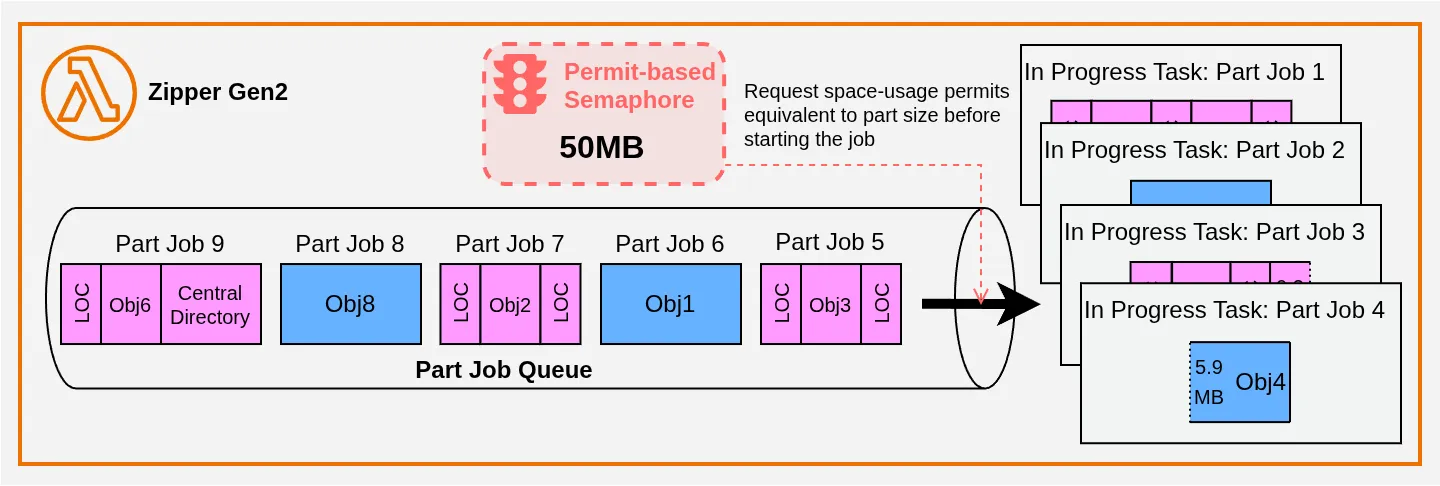
Each Part Job runs a set of sub-tasks that create the part in S3 (for UploadPartCopy, that’s just a single S3 API call). Taking Part Job 3 as an example, the work looks like this:
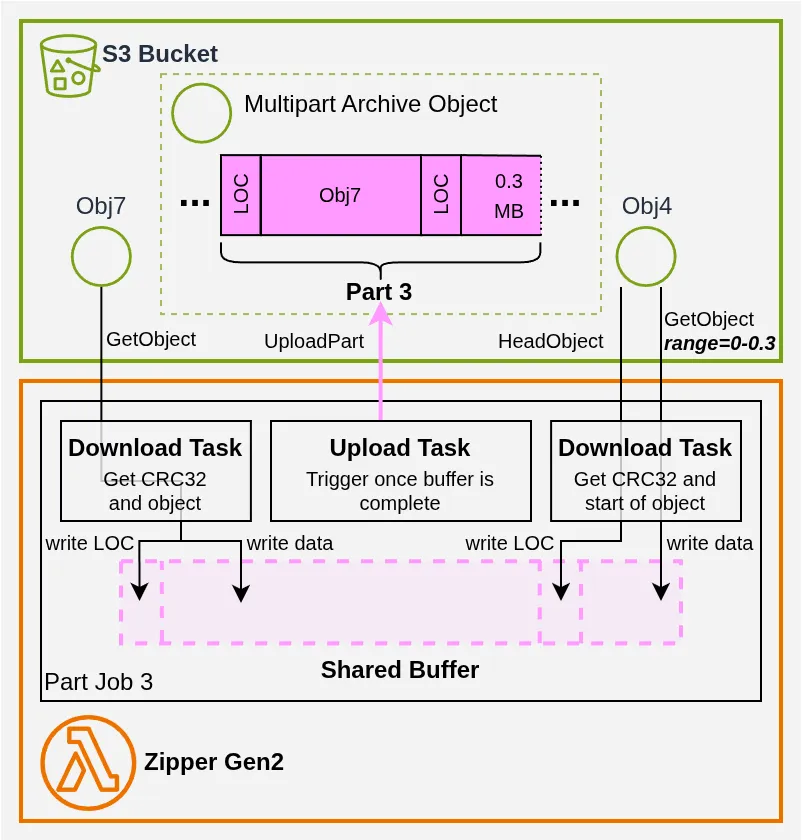
The Shared Buffer is a small data structure I wrote to allow multiple tasks (and therefore potentially multiple threads) to write into the same buffer, eliminating unnecessary data copies between the download and upload phases.
CRC32 #
Note also that the LOC (and the CDFH) must contain the CRC32 checksum of each file. As it happens, all official AWS S3 clients (the AWS CLI, the SDKs, the console) systematically attach this checksum to objects. We can count on it being there. A standard GetObject always includes the CRC32 in its response — unless it’s a ranged request 🤷. So for all BigObj, we need to issue a HeadObject call to retrieve that information.
The CRC32 retrieved by each Part Job also needs to be forwarded to the final Part Job, which is responsible for writing the last part containing the Central Directory. In Rust 🦀, the tokio library — which orchestrates thousands (or even millions) of concurrent tasks and which I use in every Rust/Lambda project — provides Multiple Producer Single Consumer (MPSC) channels that are a perfect fit here. It’s not shown in the diagrams, but an MPSC channel is created alongside the Part Jobs: all of them get a copy of the sender, except the last one, which gets the receiver. That’s how the CRC32 flows through. If you’re curious, see the PartJobsBuilder code.
Conclusion #
In the end, my Gen2 reaches 106 seconds with very little variation — exactly half the time of my Gen1!
I’m genuinely glad that Fitz thought of UploadPartCopy. In my first article, I was so proud that my code’s performance was approaching the theoretical 200-second ceiling that I forgot to ask whether there was a fundamentally different approach. A lesson worth keeping 😉!
That said, I have to renew the challenge with even more conviction: Gen2 is, in my opinion, an architecture that’s even harder to get right and squeeze to its optimum than Gen1. So — will anyone finally take a crack at it in Go 😏?
Contact Me #
If you encounter a use case similar to this one and would like to discuss it, feel free to contact me.
I also offer other services around Rust and AWS, and I maintain several open-source libraries that can make integrating Rust into your AWS ecosystem easier.
SebSto’s numbers differ from what I report because I optimized each Lambda’s configuration for cost rather than for speed. As I recall, the configuration he used for his Swift Lambda was around 750 MB of RAM. Also, results can vary somewhat depending on the time of day, but I’ve never seen the ranking change. ↩︎
Fitz mentioned in his LinkedIn post that SebSto had nerd-sniped him with my little challenge, so it’s only natural that I get nerd-sniped right back 🤣 ↩︎
There are quite a few errors (calculation errors, reasoning errors, incorrect claims about Lambda bandwidth scalability, a supposed design that would allegedly do the job in 60 seconds…). That said, the core ideas are correctly described. ↩︎
More precisely, they follow a normal distribution centered at 5 MB with a standard deviation of 1 MB. To avoid extremes, the minimum is set to 2 MB and the maximum to 8 MB. ↩︎
He makes the mistake of separating BigObj and SmallObj into two distinct pools for forming his
UploadPart/UploadPartCopyduos, so that when he runs out of SmallObj, he stops creating duos and plans to download all remaining BigObj instead. That’s clearly suboptimal: it’s better to pair the remaining BigObj together in a duo so you can copy half of them. ↩︎At minimum, the 3 seconds spent just fetching CRCs are wasted. But that alone can’t account for the whole gap. ↩︎
In fact, if you look closely at the example, you can do better by swapping Obj7 and Obj6, which allows Obj4 to be copied in full instead of being split to pad an
UploadPart(the final part will be under 5 MB, but since it’s the last one, that’s allowed). ↩︎